

Anatomy of a flow
On this page
A flow is a deployed, versioned configuration of one workspace. It’s what a flowId points to, and what you build in the dashboard’s Configure tab.
What a flow has
- A workspace: Pre-KYC, Age Verification, Proof of Human, Sovereign, or Custom Config. The workspace decides what the user proves and which rules you can set.
- A name (plus a slug and an optional description): how you identify the flow.
- A verification mode: Backend (the default) or On-chain (Custom Config is backend-only). A setting like any other: it’s part of the deployed config.
- Rules: the predicate config (minimum age, country allow/deny list, OFAC), see below.
- From the Configure tab it also carries a security level (Standard or Hi-security) and any Additional data reveals you turn on. The organization name and icon (shown on the hosted page) come from the org, not the flow.
Two things are not part of a flow:
- Document choice. There’s no per-flow document allowlist, the user verifies with whichever supported document they hold. See Supported documents.
- Redirect URLs.
successUrlandfailureUrlare optional, per-session redirect URLs passed tosessions.create(...). If a session omits them, the hosted page falls back to its own built-in result screens.
Rules
Rules are predicates over identity attributes. The user proves each one without revealing the underlying value. The deployed config is a small JSON object:
{
  "minimumAge": 18,
  "excludedCountries": ["PRK", "IRN"],
  "ofac": true
}| Field | Type | Notes |
|---|---|---|
minimumAge | integer | Age floor (13–110). The user proves they are at least this old without revealing their birth date. |
excludedCountries | string array | Issuing countries to deny (denylist). ISO 3166-1 alpha-3 codes, sorted. Mutually exclusive with includedCountries. |
includedCountries | string array | Issuing countries to allow (allowlist). Enforced against the disclosed nationality, so it forces the Nationality reveal. Mutually exclusive with excludedCountries. |
ofac | boolean | When true, the user must clear the OFAC sanctions list. |
A Proof of Human flow has no rule fields; uniqueness is intrinsic to the document.
A Sovereign flow uses a different, minimal shape: a required, non-empty includedCountries allowlist plus a securityLevel (standard or biometric), and nothing else, no ofac, minimumAge, or excludedCountries. Its allowlist is enforced against the holder’s disclosed nationality.
{
  "includedCountries": ["AUT", "BEL", "DEU"],
  "securityLevel": "biometric"
}
A Custom Config flow also has its own shape: a required disclosures object (at least one field true), an ofac boolean, and a securityLevel, with no age or country predicates:
{
  "disclosures": { "fullName": true, "dateOfBirth": true, "documentNumber": true },
  "ofac": true,
  "securityLevel": "biometric"
}
This same config object is echoed back on the webhook as proof_attributes; a valid status means every predicate in it passed. See Disclosures and the Event catalog.
Immutable once deployed
A deployed flow can’t be edited. Its config is frozen, captured as a version (flowVersionId), and every session pins to the exact version it ran against, so your audit log always shows what a user was verified against.
To change anything, you don’t edit, you archive the flow and create a new one (with its own flowId). A workspace keeps one active flow at a time, except Custom Config, where an organization runs many active flows side by side and the dashboard shows them as a list.
Lifecycle
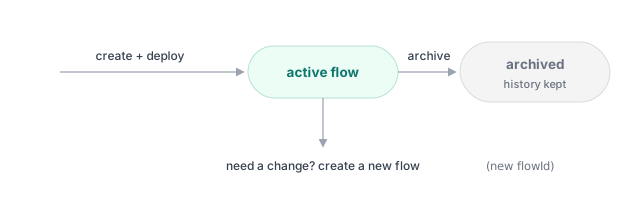
Archived flows stop accepting new sessions but keep their history for audit. See Archive.
Related
- Disclosures: every outcome a proof can attest to.
- Supported documents: what each credential type can prove.
- Test vs. live.
- Configure a workspace.
Thanks — what went wrong?
Thanks for your feedback!