

Billing
Settings → Usage & Billing. See your credit usage and manage your plan. For the credit model and how cost is computed, see Credits and usage.
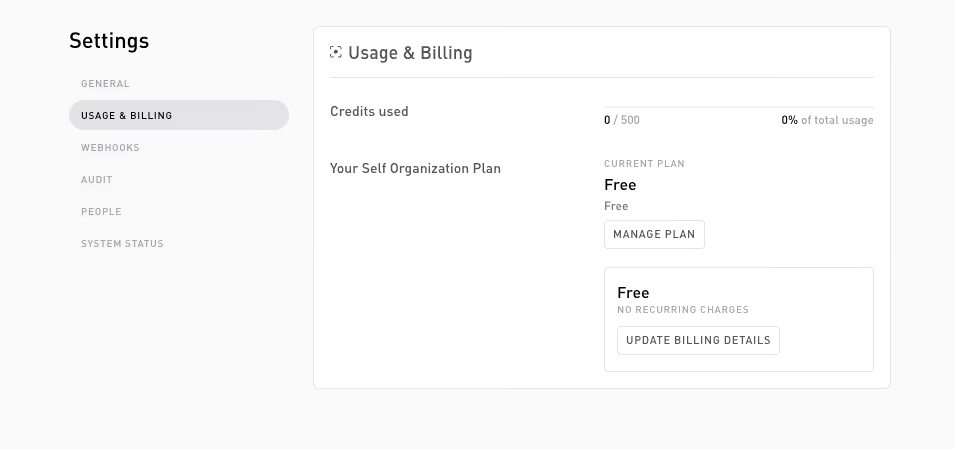
What’s on the tab
Credits used
A meter showing how many credits you’ve used against your plan’s allotment, and how many remain. Enterprise plans have no fixed cap, so the meter shows the remaining balance only.
Your Self Organization Plan
Your current plan (Free, Starter, or Enterprise), its price, and the cycle line: Next invoice on {date} when it renews, or Subscription ends on {date} if you’ve cancelled.
The cycle line also surfaces payment problems, and these take priority over dates:
- Payment failed — update your payment method to restore your credits: your last renewal charge didn’t go through. Fix the payment method via Update billing details.
- Finish setting up your subscription: checkout started but never completed.
- Renewal pending: the cycle rolled over and the renewal is being processed.
Actions
These actions are owner/admin only; plain members see the meter and plan summary as read-only.
- Manage plan: opens the pricing dialog to change or upgrade your plan. Free is the default, Starter is self-serve, Enterprise is arranged with sales. See Plans.
- Update billing details: opens the secure Stripe customer portal, where you manage your payment method and view past invoices. Self never stores your card details, only a customer reference.
Running low
To add capacity, upgrade your plan from Manage plan (or talk to sales about Enterprise).
Related
- Plans: what each tier includes.
- Credits and usage: how the per-verification cost works.
Thanks — what went wrong?
Thanks for your feedback!