

People
On this page
Settings → People. Invite teammates and see who’s on your organization. Inviting is limited to owner and admin roles.
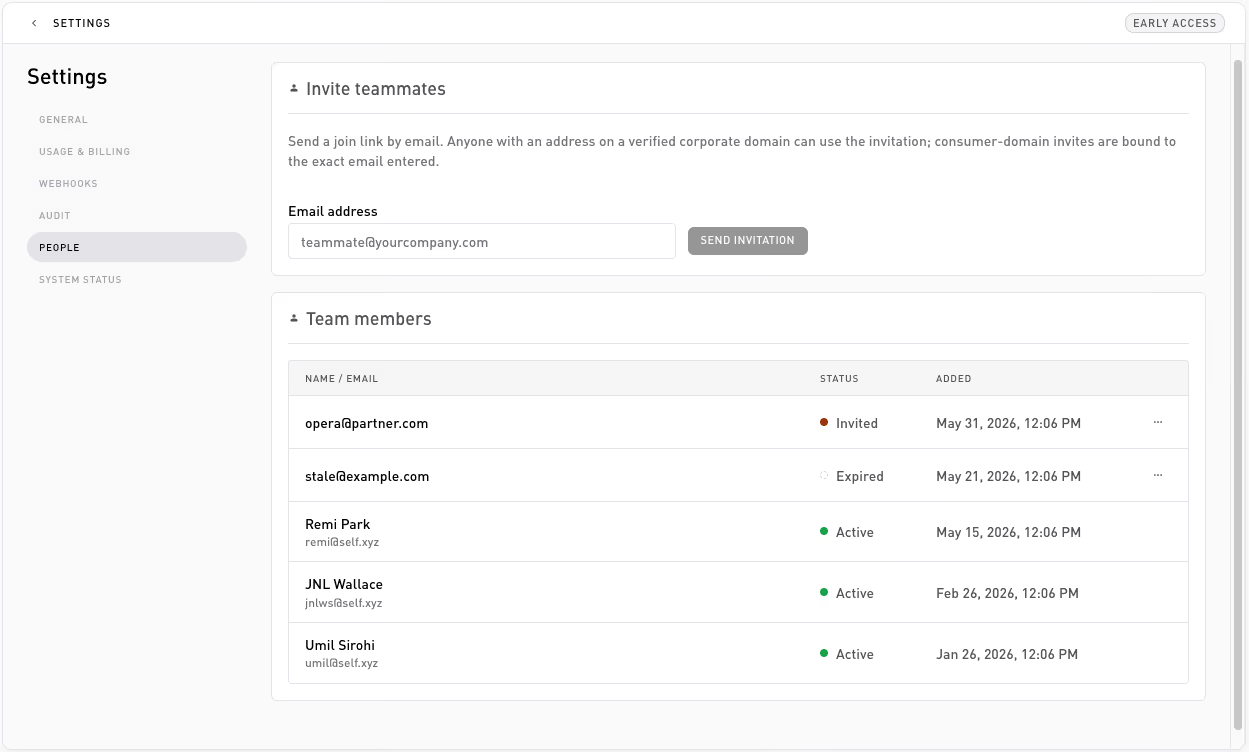
Invite a teammate
In the Invite teammates card, enter an email, pick a role (member or admin; owners can also invite another owner), and click Send invitation. Self emails them a join link.
- The invitation is bound to the exact email you entered; only that address can accept it.
- A person belongs to one organization at a time, so accepting your invite moves them out of their current org (their own default org is kept for them to return to later).
- Acceptance is refused while the invitee’s current organization still has an active paid subscription; they need to cancel or downgrade that plan first.
Team members
The Team members card lists everyone on the org and every outstanding invite:
| Column | Notes |
|---|---|
| Name / Email | Stacked. Name fills in once the person accepts. |
| Role | Owner, Admin, or Member. |
| Status | Active (joined), Invited (pending), or Expired. |
| Added | When they were invited or joined. |
Pending and expired invitations have a ⋯ menu with Resend and Revoke. Active members can be removed via Remove from organization (owner/admin only). A few guardrails apply: you can’t remove yourself (to take yourself off an org, leave it), an admin can’t remove an owner, and the last owner can’t be removed. Removing a member or revoking their invite doesn’t touch any API keys, those belong to the org, not the person.
Leave an organization
Anyone can leave an org they were invited to, no owner or admin needed: Settings → General → Leave organization. Leaving returns you to your default organization (the one created when you first signed up), and you can be invited back later.
A few guardrails here too:
- You can’t leave your default organization: there’s nowhere to return to, so the action isn’t shown there.
- The last owner of an org with other members must promote another owner before leaving.
- An org with an active paid subscription can’t be left; cancel or downgrade the plan first. A subscription already set to cancel at period end doesn’t block.
If you were the only member, the org is archived when you leave.
Roles
Every member has one of three roles:
| Role | Can do |
|---|---|
owner | Everything, including all billing actions. |
admin | Invite teammates, manage flows, generate and revoke API keys, manage webhooks, deploy on-chain contracts, and manage the plan. |
member | Read access: view flows, the activity log, usage, and webhook delivery history. |
Only owner and admin can invite teammates, manage API keys, manage webhook endpoints, and deploy or retry on-chain contracts.
Thanks — what went wrong?
Thanks for your feedback!