

What is Self Enterprise
# What is Self Enterprise
[Self Enterprise](https://dashboard.self.xyz) is the managed plane for zero-knowledge identity verification. You configure flows in a dashboard, call a single SDK, and receive signed webhook events when users verify. We handle credential issuance, proof verification, and the verification record.
The integration is small: one `sessions.create(...)` call, a hosted page the user opens, and a webhook on your backend.
## What it replaces
Self Enterprise is the managed offering on top of the open Self protocol. It bundles the parts you'd otherwise build and operate yourself:
| Concern | Self SDK (Legacy) | Self Enterprise |
| ----------------------------- | --------------------------------------------- | --------------------------------------------------- |
| Configure a verification flow | Encode disclosures in your contract / backend | Configure in the dashboard, deploy a version |
| Issue credentials to users | Run your own backend + hosted page | Hand the user a `verificationUrl` from the API |
| Verify a proof | Run the verifier yourself (or on-chain) | We verify the proof; you get a signed webhook |
| Store the result | Build your own store + audit log | Activity log in the dashboard, plus signed webhooks |
If your team wants a fast path from "we want ZK identity verification" to a working integration, Enterprise is it.
## Who is it for?
- **Consumer apps** running sybil resistance, age gates, or geographic compliance. Anyone who needs verified identity but doesn't want to build verification infrastructure.
- **Fintech / regulated platforms** that need KYC-grade verification with auditable trails.
- **Marketplaces** that want to verify both sides of a trade without holding PII.
- **Internal compliance teams** at protocols who'd otherwise hand-roll a verifier.
## How it fits together
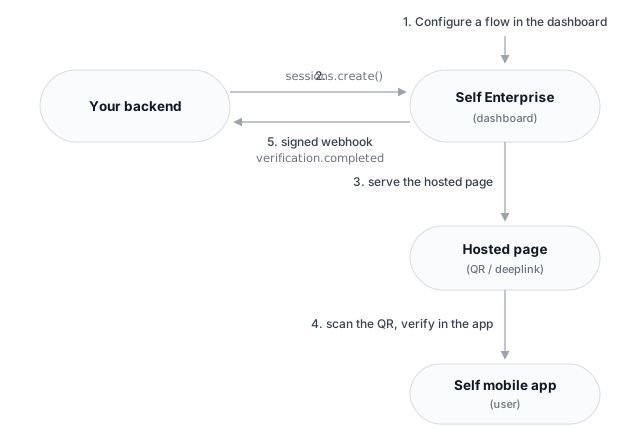
1. **You configure a flow** on the Self dashboard, picking one of five workspaces: **Pre-KYC**, **Age Verification**, **Proof of Human**, **Sovereign**, or **Custom Config**.
2. **You call `sessions.create(...)`** via the Enterprise SDK when a user needs to verify. We return a `verificationUrl`.
3. **You send the user to that URL.** Self serves a hosted page with a QR code (or a deeplink button on mobile).
4. **The user verifies in the Self mobile app**, scanning the QR or tapping the link. The app produces a ZK proof of the requested attributes and submits it to Self.
5. **We verify the proof** and fire a signed webhook to your backend. You read the verified attributes and proceed.
:::cta{title="Take the guided tour" href="/quickstart/" button="Guided tour"}
Walk the end-to-end integration interactively, from sign-up to your first verified user.
:::
Read https://docs.self.xyz/docs/self-enterprise/get-started/what-is-self-enterprise.md so I can ask questions about this Self documentation page.
On this page
Self Enterprise is the managed plane for zero-knowledge identity verification. You configure flows in a dashboard, call a single SDK, and receive signed webhook events when users verify. We handle credential issuance, proof verification, and the verification record.
The integration is small: one sessions.create(...) call, a hosted page the user opens, and a webhook on your backend.
What it replaces
Self Enterprise is the managed offering on top of the open Self protocol. It bundles the parts you’d otherwise build and operate yourself:
| Concern | Self SDK (Legacy) | Self Enterprise |
|---|---|---|
| Configure a verification flow | Encode disclosures in your contract / backend | Configure in the dashboard, deploy a version |
| Issue credentials to users | Run your own backend + hosted page | Hand the user a verificationUrl from the API |
| Verify a proof | Run the verifier yourself (or on-chain) | We verify the proof; you get a signed webhook |
| Store the result | Build your own store + audit log | Activity log in the dashboard, plus signed webhooks |
If your team wants a fast path from “we want ZK identity verification” to a working integration, Enterprise is it.
Who is it for?
- Consumer apps running sybil resistance, age gates, or geographic compliance. Anyone who needs verified identity but doesn’t want to build verification infrastructure.
- Fintech / regulated platforms that need KYC-grade verification with auditable trails.
- Marketplaces that want to verify both sides of a trade without holding PII.
- Internal compliance teams at protocols who’d otherwise hand-roll a verifier.
How it fits together

- You configure a flow on the Self dashboard, picking one of five workspaces: Pre-KYC, Age Verification, Proof of Human, Sovereign, or Custom Config.
- You call
sessions.create(...)via the Enterprise SDK when a user needs to verify. We return averificationUrl. - You send the user to that URL. Self serves a hosted page with a QR code (or a deeplink button on mobile).
- The user verifies in the Self mobile app, scanning the QR or tapping the link. The app produces a ZK proof of the requested attributes and submits it to Self.
- We verify the proof and fire a signed webhook to your backend. You read the verified attributes and proceed.
Was this page helpful?
Thanks. What went wrong?
Thanks for your feedback!