

Aadhaar
# Aadhaar
## What is Aadhaar?
Aadhaar is India’s national digital identity system maintained by UIDAI (Unique Identification Authority of India).
- It is a **12-digit unique identity number** issued to residents of India, based on their biometric and demographic data.
- Aadhaar serves as a **foundational ID** that can be used to verify identity across financial, telecom, and government services.
- Verification is done via UIDAI APIs or Aadhaar-linked services, such as QR codes.
:::warning
UIDAI does not sign the entire Aadhaar number, only the last 4 digits. As this does not have enough entropy to create a nullifier we also use other fields such as the name, date of birth, and gender. This means Aadhaar-derived uniqueness is weaker than passport-derived uniqueness: a person can change their Aadhaar and be considered a "new" person in the protocol. Although we have chosen fields that are hard to change, edge cases do pop up, such as people changing their names due to marriage, divorce, or other legal corrections. If sybil resistance is critical to your use case, contact us before relying on Aadhaar alone.
:::
## Registering with Aadhaar on Self
Self allows users to prove identity using Aadhaar in a **privacy-preserving** way. Registration uses the **unmasked e-Aadhaar PDF**, which you can obtain in two ways:
1. #### Using the Aadhaar app
1. #### Download the official **Aadhaar app** from UIDAI ([Android](https://play.google.com/store/apps/details?id=in.gov.uidai.pehchaan)/[iOS](https://apps.apple.com/in/app/aadhaar/id6744029871)).
2. #### Sign in and tap **Download Aadhaar**.
<figure><img loading="lazy" src="/docs/docs-assets/aadhaar-download-mockup.avif" alt="The Download Aadhaar action in the UIDAI Aadhaar app" width="240"><figcaption><p>Download Aadhaar</p></figcaption></figure>
3. #### Choose **Unmasked Aadhaar** and download the PDF.
<figure><img loading="lazy" src="/docs/docs-assets/aadhaar-unmasked-mockup.avif" alt="The Masked / Unmasked Aadhaar selector with Unmasked Aadhaar selected" width="240"><figcaption><p>Select "Unmasked Aadhaar"</p></figcaption></figure>
4. #### Upload that PDF in the Self app to register.
1. #### Self processes the PDF to derive a unique **nullifier** (an identifier) that allows users to prove uniqueness without sharing their Aadhaar number directly.
2. #### By using the UIDAI website
1. #### Go to the [UIDAI website](https://myaadhaar.uidai.gov.in/genricDownloadAadhaar/en)
2. #### Enter your Aadhaar number, and verify yourself with an OTP to get a PDF. Do not select the masked Aadhaar option, as the download must be unmasked.
3. #### Upload that PDF in the Self app to register.
:::caution
Only the **unmasked** e-Aadhaar is accepted for verification. Uploading a QR code image is no longer supported, so upload the PDF itself.
The older **mAadhaar** app is a separate app that is deprecated and no longer usable. Use the links above.
:::
:::note
The password to the PDF in both cases is the first four letters of your name in caps following by your birth year.
:::
## Working with attributes in Aadhaar
Since Aadhaar uses a different format than passports, keep in mind that some of the disclosed attribute formats can be different.
### `GenericDiscloseOutputV2`
<table><thead><tr><th>Field </th><th>Type</th><th>Formatting / Value</th></tr></thead><tbody><tr><td><pre><code>forbiddenCountriesListPacked
</code></pre></td><td><code>uint256[4]</code></td><td>Packed bytes of all countries into an array 4 <code>uint256</code> numbers.</td></tr><tr><td><pre><code>issuingState
</code></pre></td><td><code>string</code></td><td>Varies**</td></tr><tr><td><pre><code>name
</code></pre></td><td><code>string[]</code></td><td>First value contains the entire name (and it may vary)</td></tr><tr><td><pre><code>idNumber
</code></pre></td><td><code>string</code></td><td>Last 4 letters of the aadhaar number. </td></tr><tr><td><pre><code>nationality
</code></pre></td><td><code>string</code></td><td><code>'IND'</code></td></tr><tr><td><pre><code>dateOfBirth
</code></pre></td><td><code>string</code></td><td><code>DD-MM-YYYY</code></td></tr><tr><td><pre><code>gender
</code></pre></td><td><code>string</code></td><td><code>'M' | 'T' | 'F'</code></td></tr><tr><td><pre><code>expiryDate
</code></pre></td><td><code>string</code></td><td><code>'UNAVAILBLE'</code></td></tr><tr><td><pre><code>olderThan
</code></pre></td><td><code>uint256</code></td><td><code>0 - 99</code></td></tr><tr><td><pre><code>ofac
</code></pre></td><td><code>bool[3]</code></td><td>Each value is true if ofac check is enabled.</td></tr></tbody></table>
### `GenericDiscloseOutput`
<table><thead><tr><th>Field</th><th>Type</th><th>Formatting / Value</th></tr></thead><tbody><tr><td><pre><code>forbiddenCountriesListPacked
</code></pre></td><td><code>string[]</code></td><td>Packed bytes list of forbidden countries</td></tr><tr><td><pre><code>issuingState
</code></pre></td><td><code>string</code></td><td>Varies</td></tr><tr><td><pre><code>name
</code></pre></td><td><code>string</code></td><td>Full name. Can vary as well</td></tr><tr><td><pre><code>idNumber
</code></pre></td><td><code>string</code></td><td>Last 4 digits of aadhaar</td></tr><tr><td><pre><code>nationality
</code></pre></td><td><code>string</code></td><td><code>'IND'</code></td></tr><tr><td><pre><code>dateOfBirth
</code></pre></td><td><code>string</code></td><td><code>YYYYMMDD</code></td></tr><tr><td><pre><code>gender
</code></pre></td><td><code>string</code></td><td><code>'M' | 'T' | 'F'</code></td></tr><tr><td><pre><code>expiryDate
</code></pre></td><td><code>string</code></td><td><code>'UNAVAILABLE'</code></td></tr><tr><td><pre><code>minimumAge
</code></pre></td><td><code>string</code></td><td><code>'00'-'99'</code> </td></tr><tr><td><pre><code>ofac
</code></pre></td><td><code>bool[]</code></td><td>True if in ofac</td></tr></tbody></table>
:::note
\*\*Varies refers to a string being all caps / lowercase / first letter in caps and the rest in lowercase.
:::
Read https://docs.self.xyz/docs/self-enterprise/reference/document-specifications/aadhaar.md so I can ask questions about this Self documentation page.
On this page
What is Aadhaar?
Aadhaar is India’s national digital identity system maintained by UIDAI (Unique Identification Authority of India).
- It is a 12-digit unique identity number issued to residents of India, based on their biometric and demographic data.
- Aadhaar serves as a foundational ID that can be used to verify identity across financial, telecom, and government services.
- Verification is done via UIDAI APIs or Aadhaar-linked services, such as QR codes.
Registering with Aadhaar on Self
Self allows users to prove identity using Aadhaar in a privacy-preserving way. Registration uses the unmasked e-Aadhaar PDF, which you can obtain in two ways:
-
Using the Aadhaar app
-
Download the official Aadhaar app from UIDAI (Android/iOS).
-
Sign in and tap Download Aadhaar.
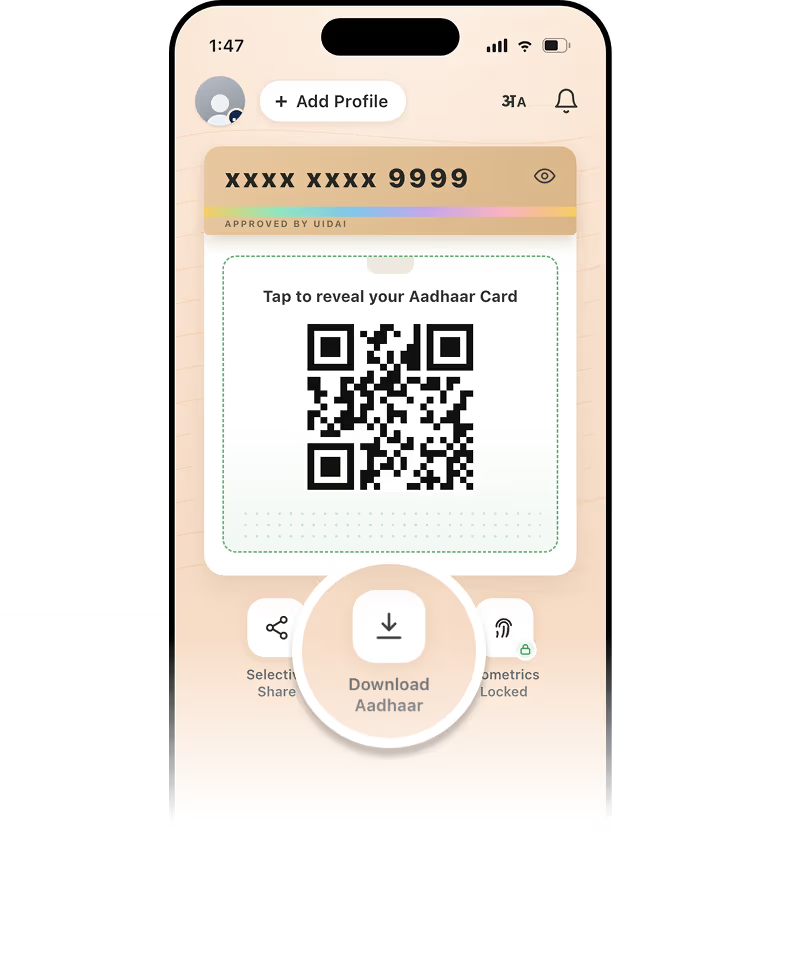
Download Aadhaar
-
Choose Unmasked Aadhaar and download the PDF.
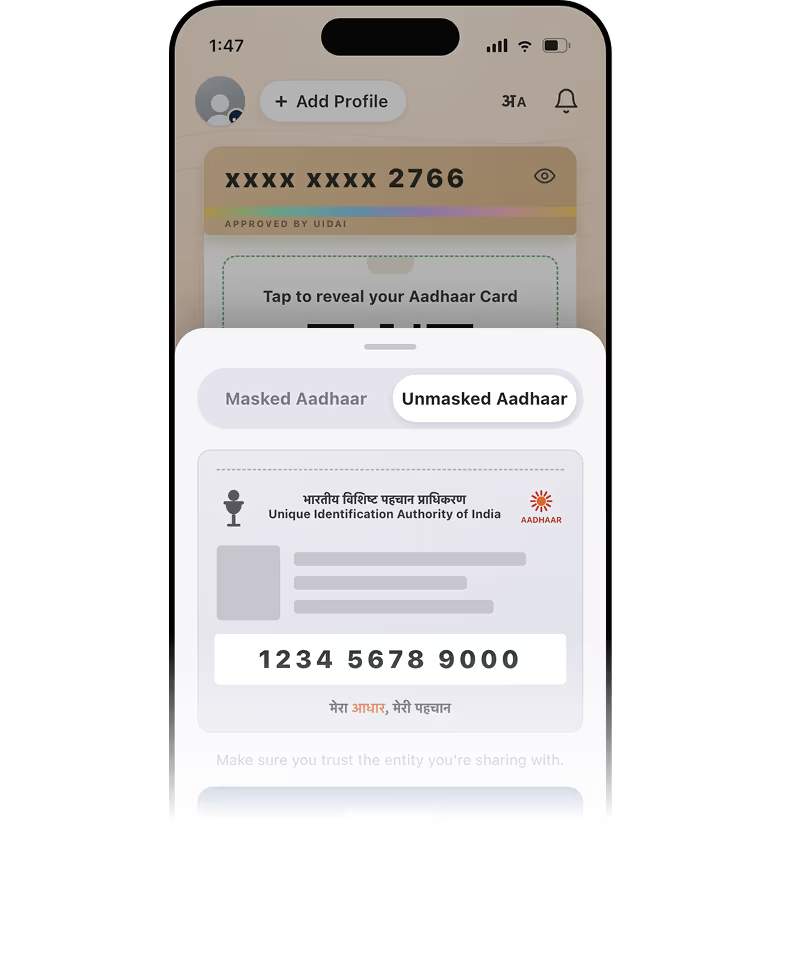
Select "Unmasked Aadhaar"
-
Upload that PDF in the Self app to register.
-
Self processes the PDF to derive a unique nullifier (an identifier) that allows users to prove uniqueness without sharing their Aadhaar number directly.
-
-
-
By using the UIDAI website
-
Go to the UIDAI website
-
Enter your Aadhaar number, and verify yourself with an OTP to get a PDF. Do not select the masked Aadhaar option, as the download must be unmasked.
-
Upload that PDF in the Self app to register.
-
Working with attributes in Aadhaar
Since Aadhaar uses a different format than passports, keep in mind that some of the disclosed attribute formats can be different.
GenericDiscloseOutputV2
| Field | Type | Formatting / Value |
|---|---|---|
| uint256[4] | Packed bytes of all countries into an array 4 uint256 numbers. |
| string | Varies** |
| string[] | First value contains the entire name (and it may vary) |
| string | Last 4 letters of the aadhaar number. |
| string | 'IND' |
| string | DD-MM-YYYY |
| string | 'M' | 'T' | 'F' |
| string | 'UNAVAILBLE' |
| uint256 | 0 - 99 |
| bool[3] | Each value is true if ofac check is enabled. |
GenericDiscloseOutput
| Field | Type | Formatting / Value |
|---|---|---|
| string[] | Packed bytes list of forbidden countries |
| string | Varies |
| string | Full name. Can vary as well |
| string | Last 4 digits of aadhaar |
| string | 'IND' |
| string | YYYYMMDD |
| string | 'M' | 'T' | 'F' |
| string | 'UNAVAILABLE' |
| string | '00'-'99' |
| bool[] | True if in ofac |
Was this page helpful?
Thanks. What went wrong?
Thanks for your feedback!